Touchgrind Skate 2
- 3.8
- Rating
- 50.00M
- Installs
- Free
- Price
 Analysis by App-foxy
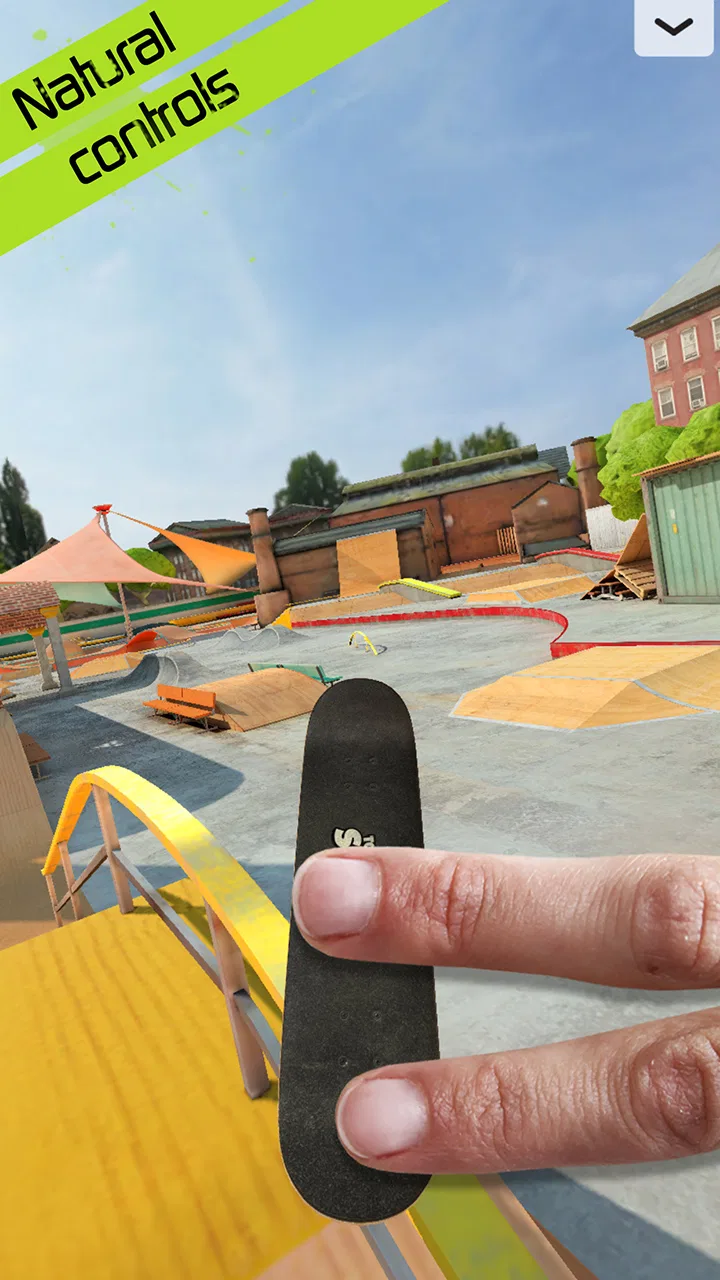
Touchgrind Skate 2 is the kind of sports game that looks simple for a few seconds, then asks for much more precision than a normal tap-and-swipe title. I found that its appeal comes from controlling a skateboard with two fingers rather than steering a character with ordinary buttons. That choice makes the first few minutes feel unfamiliar, but it also gives every clean movement a satisfying sense of responsibility. When the board lands properly, I feel that I caused it rather than merely selected an animation.
Developed by Illusion Labs, this free game sits in the skateboarding corner of mobile sports games. It is aimed at people who enjoy practicing a physical skill on a touchscreen, not just collecting quick wins. The store presents it as a realistic multi-touch skateboarding experience, and that description makes sense once the controls begin to demand separate jobs from each finger. I would recommend approaching it as a compact practice game: a title to open for a few minutes, repeat a difficult movement, and gradually become more comfortable.
The game is available for Everyone and has reached over ten million installs, which says a lot about its broad accessibility. At the same time, its average rating is 3.8 from around 305 thousand ratings, so it clearly will not suit every player. My own reaction is that the unusual control scheme is both its strongest feature and its biggest barrier. If you want immediate, effortless skating, this may feel stubborn. If you like learning a tactile system, it has far more character than a typical arcade sports game.
You May Also Like

 Google Keep - Notes and lists
Google Keep’s Quiet Growth Shows the Appeal of Simpler Notes
As mobile work gets busier, Google Keep keeps winning a simple contest: capture a thought quickly, find it later, and get on with the day.

 Blood Strike: 2.5 Anniversary
Blood Strike’s Loadouts Turn Every Drop Into a Tactical Gamble
A close look at Blood Strike’s custom loadouts: how fast access to signature weapons reshapes its battle royale rhythm, rewards preparation, and narrows the gap between fights.

 Pandora - Music & Podcasts
Pandora’s Music Is Easy to Start, but Harder to Recover
Pandora’s strength is its low-effort path from a seed to a station. Its weak spot is how much confidence it asks you to place in connection, setup, and quiet recovery.

 8 Ball Pool
 Is Built on Rivalries, Rematches, and Routine
A close look at the rivalries, rematches, shared routines, and unanswered safety questions that turn a quick pool match into a persistent mobile community.

 Samsung Music
’s Quiet Strength Is Playing What You Already Own
Its reach comes less from spectacle than from dependable access to a personal library. That simplicity is both the app’s strongest retention engine and its ceiling.

 AccuWeather: Weather Radar
AccuWeather Review: A Quick, Clear Forecast for Everyday Decisions
For everyday plans, the best forecast is the one you can understand quickly. AccuWeather makes rain timing, radar, and local conditions easy to act on, with a few trade-offs.
More From Our News Desk



What to expect before your first run
The first important adjustment is mental: you are not moving a little skater around a screen with a virtual joystick. You are working directly with the board. One finger helps control the front area and another the rear, so your hand position affects what happens next. This makes basic movement feel closer to handling a small object than guiding a conventional game avatar. I needed a little patience before my fingers stopped fighting each other.
That learning curve is not a flaw by itself, but it changes how I judge progress. In many mobile sports games, success arrives after understanding a few buttons. Here, success depends on timing, pressure, placement and keeping the board stable through the whole action. A movement that looks easy in a clip can require several attempts when you are learning it yourself. The best way to play is to treat failed attempts as information rather than as wasted turns.
The free download makes it easy to try without committing money at the start. There are in-app purchases ranging from $2.49 to $8.99 per item, so I would advise a new player to spend time with the basic experience before deciding whether anything extra is worthwhile. The purchase range matters less than the control feel: no optional item can replace learning where to place your fingers or how quickly to release them.
On compatible devices, the game requires Android 6.0 or later. The current version is 1.7.0, and the title has been available since December 10, 2015. Those details are useful when deciding whether an older phone or tablet is suitable, but the more practical question is whether your screen gives your fingers enough room to work without covering the board. A cramped display can make a demanding control system feel harder than it really is.
How I would begin after installing
I would start somewhere quiet, with the phone held in the position that feels natural rather than trying to imitate another player’s grip. Before attempting a trick, I would spend a few moments observing how the board responds to small movements. Move one finger at a time, then make a gentle adjustment with both. This reveals whether the device is registering your touch comfortably and gives you a reference for the board’s balance.
It is tempting to rush toward impressive tricks because skating games usually advertise dramatic jumps. That is the wrong first goal here. My first target would be controlled movement followed by a stable landing. A short, ordinary run teaches more than a wild attempt that ends instantly. Once you can repeat a simple action, you have something to build on instead of guessing at every attempt.
I also recommend keeping your fingers relaxed. I initially found myself pressing harder when a movement went wrong, but extra pressure did not make the board more obedient. It usually made my motion less precise. Light contact and deliberate movement are more useful than trying to force the screen to respond. This is one of the less obvious lessons of the game: the best control often comes from reducing effort.
Another practical tip is to avoid changing several things at once. If a landing fails, repeat the same approach and alter only the timing of the release or the position of one finger. That turns practice into a small experiment. Changing your speed, finger placement and direction simultaneously makes it impossible to know what helped. I found that this method made improvement feel much more reliable.
The first meaningful success
For a first-time player, a meaningful success is not a complicated trick. It is completing a controlled movement and finishing with the board still under control. That moment proves that the two-finger idea is beginning to make sense. I would repeat that basic success several times before attempting anything more ambitious, because consistency matters more than a lucky result.
When you try a new action, watch the board rather than the imagined result. The board’s angle tells you whether the motion is developing correctly. If it begins to rotate too early, your fingers may be moving out of sequence. If it rises but does not return cleanly, your release may be late or uneven. I found that paying attention to these small visual clues was more effective than simply swiping faster.
A useful everyday scenario is a short break between other tasks. I can imagine opening the game while waiting for an appointment, practicing one movement for a few minutes, and closing it after improving one part of the landing. It works better for that kind of focused session than for distracted play while walking or multitasking. The controls reward attention, and even a small interruption can ruin an attempt.
Once a basic action feels repeatable, try linking it to movement rather than performing it from a standstill. This is where the game begins to feel more like skating and less like testing touch gestures. The trade-off is that a moving board gives you less time to correct mistakes. That extra difficulty is useful, though, because it teaches you to prepare earlier instead of reacting at the last instant.
Where first-time players usually get confused
The most common confusion is assuming that every failed trick means the gesture was wrong. Sometimes the gesture is reasonable, but the board was already in a poor position before it began. A slightly unstable approach can make a good movement look broken. I learned to separate the setup from the trick itself: first create a predictable approach, then focus on the action.
Another source of frustration is expecting the two fingers to behave like a single control. They do not. Each finger contributes to the board’s movement, and small differences in timing can change the result. If both fingers move together automatically, you may lose the ability to make fine corrections. Practicing one finger’s role at a time helps reveal why a movement is drifting or turning unexpectedly.
Players may also mistake repetition for lack of variety. The game’s depth is not necessarily found by constantly searching for a new activity; it comes from refining control. That will appeal to players who enjoy mastery, but it can frustrate anyone looking for a large sequence of instant rewards. Compared with a more conventional sports game built around buttons, this one asks you to create your own short-term goals.
I would not choose this title for a young child who wants immediate, simple play, even though its content rating is Everyone. The age rating describes suitability of content, not the difficulty of the controls. A child may enjoy experimenting with the board, but a player expecting easy success could become annoyed quickly. Likewise, people with limited screen space or who dislike multi-touch gestures may have a better time with a button-based skateboarding alternative.
There is also a difference between playing for relaxation and playing for precision. The game can be relaxing once the movements become familiar, but the early learning stage requires concentration. If I am tired, I am more likely to overcorrect and blame the game for a mistake caused by my own rushed input. Short sessions are often better than forcing progress through frustration.
How it compares with ordinary mobile sports games
Most mobile sports games simplify control so that the player can concentrate on timing, score or presentation. Touchgrind Skate 2 takes the opposite route by making control itself the central challenge. That gives it a more personal feel than a game where a tap automatically performs a polished trick, but it also means the experience is less immediately welcoming.
Compared with an endless runner, it offers less passive momentum and more room for deliberate practice. Compared with a traditional skateboarding game using virtual buttons, it gives up convenience in exchange for a direct connection between finger movement and board movement. I prefer this approach when I have time to learn, while a conventional alternative is better when I want quick, predictable action.
The game is also a better match for players who enjoy repeating a movement until it feels natural. Someone looking for a broad career structure, a story or a heavily guided progression may find the experience too focused on the act of skating. I would not install it expecting a substitute for a full console skateboarding game. Its strength is not scale; it is the tactile challenge of making a small board behave correctly.
Small habits that make practice easier
One habit that helped me was ending a session after a clean success rather than continuing until every attempt failed. That leaves a clearer sense of progress and makes it easier to remember what worked next time. It also prevents the common cycle of becoming frustrated, rushing inputs and then practicing the wrong technique.
I would keep the phone steady and avoid changing grip during a difficult attempt. A shifting device changes the relationship between your fingers and the board, especially when you are trying to make a precise correction. If your hands are uncomfortable, pause and reset rather than compensating with exaggerated movements.
It is also worth learning to recognize whether a problem is timing or positioning. If the board begins correctly but finishes badly, focus on the release. If it is already angled incorrectly before the main action, adjust the approach. This distinction is a practical shortcut because it prevents you from endlessly repeating the same gesture when the real problem happens earlier.
For players considering purchases, I would wait until the basic handling feels genuinely enjoyable. The free entry point lets you answer the important question first: do you like practicing this control system? If the answer is no, spending more will not solve the underlying mismatch. If the answer is yes, then optional purchases can be considered from a position of understanding rather than impatience.
Who should try it, and who should skip it
I think this is a strong choice for someone who wants a distinctive mobile skateboarding game and enjoys skill-based repetition. It is especially suitable for players who like discovering how a control system works, improving through small adjustments and celebrating consistency more than instant spectacle. The free price also makes trying it straightforward, provided the device meets the minimum operating-system requirement.
I would steer away from it if your priority is a fast tutorial, automatic tricks or a relaxed game that can be played without looking closely at the screen. It is also not my first recommendation for someone who dislikes games where early failure is part of the learning process. In those cases, a simpler arcade sports title with visible buttons will probably feel more satisfying.
Its audience sits between casual players and dedicated enthusiasts. A casual player can enjoy a short experiment, but the deeper reward comes from returning to improve control. That is why the rating of 3.8 from roughly 14 thousand written reviews feels understandable to me: the game has a clear identity, yet that identity depends on enjoying an unusual form of difficulty.
My next-step recommendation
After installing, I would give the game one focused session with a modest goal: learn the board’s response, complete one controlled action, and repeat it until the result feels intentional. Do not judge the whole experience by the first few failed attempts. The opening challenge is not a side issue; it is the game teaching you its language.
After that, choose one variable to improve at a time. Work on approach, then timing, then landing stability. This makes the game more reassuring for beginners because progress becomes visible in small stages. You do not need to perform a spectacular trick to know that you are getting better; a cleaner, more repeatable movement is already meaningful progress.
My final view is positive but specific. Touchgrind Skate 2 is worth trying if you want your fingers to feel directly involved in the skating. It is free, widely available and suitable for Everyone, but its real appeal is reserved for players willing to practice. Illusion Labs has built a sports game around precision rather than convenience, and that makes it memorable even when it is demanding.
I would keep it on my phone for short, attentive sessions rather than use it as a background game. When I want instant results, I would choose a simpler alternative. When I want the satisfaction of turning a clumsy movement into a repeatable one, this is the kind of game I would open. That distinction is the key to enjoying it: approach it as a hands-on skill to learn, and its unusual controls become the reason to stay.
FAQs for Touchgrind Skate 2
01What devices are compatible with Touchgrind Skate 2?
Touchgrind Skate 2 is designed for both Android and iOS devices. It requires Android version 4.0 or later and iOS 9.0 or later. It's compatible with most modern smartphones and tablets, ensuring a smooth gameplay experience across different platforms. Be sure to check your device's compatibility before downloading.
02Is Touchgrind Skate 2 free to play?
Yes, Touchgrind Skate 2 is free to download and play. However, it includes in-app purchases that offer additional features and customization options. These can enhance your gaming experience, but they are entirely optional, allowing you to enjoy the game without spending money.
03How does the control system work in Touchgrind Skate 2?
Touchgrind Skate 2 uses a unique two-finger control system that simulates a real skateboarding experience. Players use their fingers to perform tricks and maneuvers. While it may take some time to master, the controls are intuitive and provide a rewarding experience once you get the hang of them.
04Are there multiplayer options in Touchgrind Skate 2?
Touchgrind Skate 2 does not currently offer a traditional multiplayer mode. However, it does include a feature where you can challenge friends and compete for high scores. This social element allows players to engage with others and share their achievements within the game.
05What kind of customization options are available in the game?
Touchgrind Skate 2 offers extensive customization options. Players can personalize their skateboards with different decks, wheels, and stickers. While some customization features are unlocked through in-app purchases, many options are available as rewards for achieving certain objectives and milestones in the game.
Pros
- Realistic physics enhance gameplay.
- Customizable skateboards add personalization.
- Multiplayer mode for competitive play.
- Intuitive touch controls feel natural.
- Varied skate parks keep it exciting.
Cons
- Learning curve may frustrate beginners.
- No offline mode limits accessibility.
- Limited soundtrack can get repetitive.
- In-app purchases can be pricey.
- Occasional lag affects performance.

Touchgrind Skate 2
Gallery